
Setup Port Forwarding Methods

What is Port Forwarding ?
Port Forwarding is a mechanism in computer networking that allows incoming traffic from a port on the external network side (usually the Internet) to be forwarded to a specific system or service on the internal network. This capability is typically implemented in routers and firewalls that use Network Address Translation (NAT).

Under normal conditions (without port forwarding), devices within a private network are not directly accessible from the internet. NAT enables outgoing communications by translating private addresses to a public address, while blocking unsolicited incoming traffic. Port forwarding overrides this default behavior, allowing the router to direct incoming traffic received on a specific port to a designated internal host.
To understand Port Forwarding, we first need to know what happens when we connect to the internet.
1.The Internet is like a big city
Imagine the internet as a huge city, and each device (computer, phone, laptop) is a house in this city.
For someone to send a letter to your house, they need the exact address.
In the networking world:
- House address = IP Address
- Devices inside the house = computers, phones, servers
2.The Router (Modem) is like the main door of the house
In most houses:
- There is only one main door to the outside
- All members of the house come and go through that door
In a network:
- The modem/router is the only device directly connected to the internet
- All other devices are hidden behind it (internal network)
- This hiding is done through something called NAT (Network Address Translation).
3. Malware Looks for a “Ready Path”
Malware and RAT.s needs to:
- Communicate with the outside
- Receive commands or send data
When port forwarding is in place:
- Malware does not need to create a complicated connection
- It can use a pre-existing path
From a network perspective:
- This communication appears like a normal service
- Because the port is open, the connection seems legitimate
4.Establishing a Persistent Connection
In this scenario:
- The connection does not occur just once
- It can be repeated over and over again
- It can even persist after the system or modem is restarted
For this reason, it is said that:
- Port Forwarding can help maintain the persistence of malware communication
How Port Forwarding Is Configured ?
Dark Folder intends to introduce and teach some of the simplest and most common free, secure, and hassle-free port forwarding methods.
Setup PlayIT.gg (Recommended):
PLAYIT.GG is an online service that provides access to internal network applications and servers without the need for port forwarding through a router or modem.This service establishes an outbound connection from the local system to its own servers, redirecting incoming traffic to the local device.
As a result, there is no need to open ports on the modem or router, and the internal network is not directly exposed to the internet. PLAYIT.GG functions similarly to port forwarding but with a more secure relay-based communication model.
Setup NGROK (complicated):
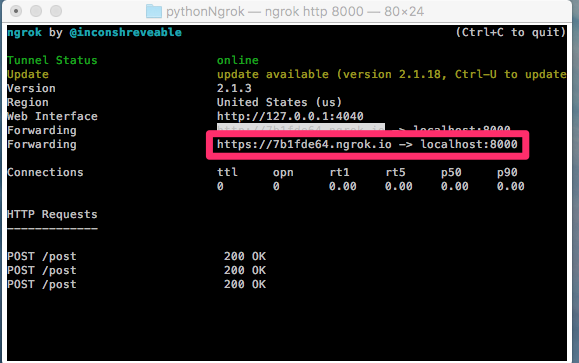
NGROK is an online service that allows you to easily expose your local servers and applications to the internet without the need for port forwarding. This tool creates a secure tunnel from your local system to ngrok’s servers, redirecting incoming traffic to your local device. With ngrok, there is no need for complex modem or router configurations, and your internal network remains protected from internet threats.
We hope this article from DarkFolder has provided valuable insights and helped you understand the concepts of port forwarding, Playit.gg, and ngrok.com better. For more helpful guides, tips, and the latest updates, make sure to sign up and explore our other resources. Stay secure and connected with DarkFolder!
